Granola AI: The Smart Notepad Redefining How We Take Meeting Notes

In the digital age, online meetings are a daily routine. Most of us face a common challenge: trying to actively listen and participate while simultaneously struggling to write down every key detail. Traditional AI meeting tools often tackle this problem by sending visible bots into your meetings, generating miles of transcript text that lack clarity and depth.
Granola emerges as a breath of fresh air—an AI meeting notepad that doesn’t just record information, but helps you think and work more efficiently.
What Is Granola?
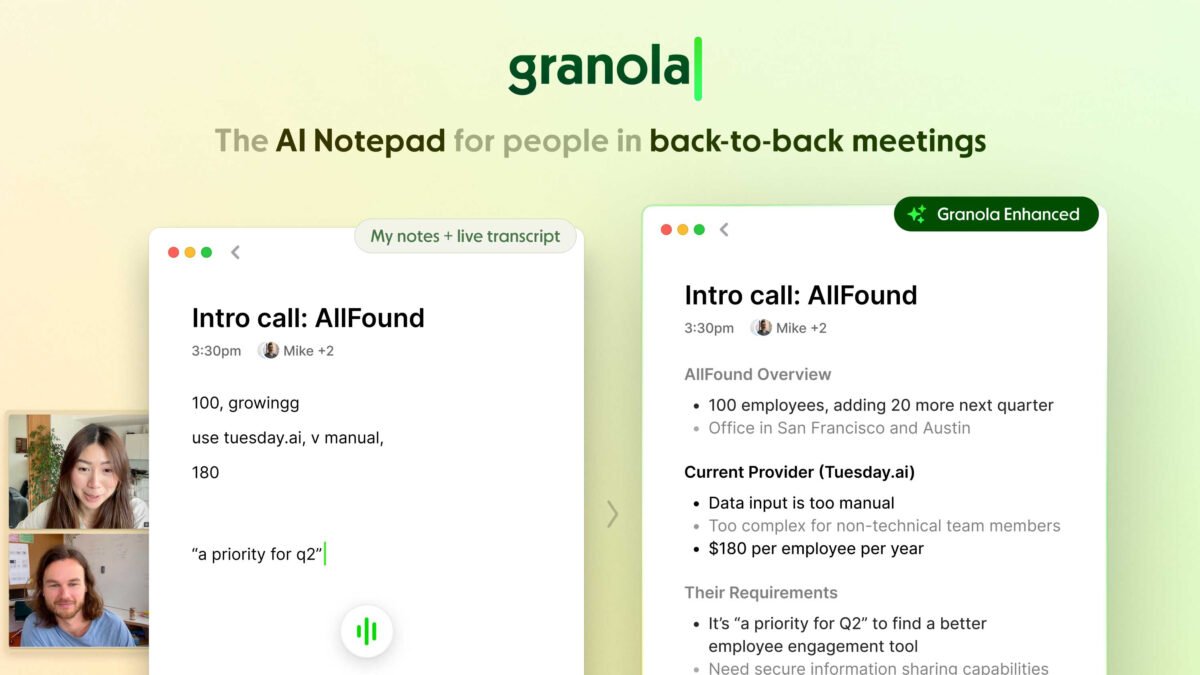
Granola is an AI meeting notepad designed for desktop and mobile devices. Unlike traditional software, Granola acts as a quiet, unobtrusive assistant running alongside your work. It listens to the meeting audio directly on your device, generates intelligent summaries, and allows you to integrate your own real-time notes effortlessly.
Standout Features That Make Granola Shine
1. No Annoying Bots in Your Meetings
Many people feel self-conscious or uncomfortable when meeting bots like “Fathom” or “Otter.ai” join Zoom or Google Meet calls. Granola captures audio straight from your system, delivering a private, seamless experience that feels as natural as writing in a personal notebook.
2. Keeps Your Voice and Intent Intact
Granola doesn’t completely replace your note-taking—it enhances it. You can jot down a few quick keywords or thoughts during the call, and Granola’s AI will synthesize your notes with the meeting audio to create a structured, contextual summary that matches your exact style.
3. A Clean, Distraction-Free Workspace
Granola features a minimalist and calm user interface designed for deep focus. It syncs smoothly across macOS, Windows, and iOS, making it easy to access your meeting insights wherever you go.
Key Features You’ll Love
-
Interactive AI Post-Meeting Q&A: You can chat directly with Granola after a call to unpack key insights. Ask targeted questions like: “What were the key decisions made?”, “What remains unresolved?”, or “What follow-up actions should I prioritize?”
-
Custom “Recipes” (Summary Frameworks): Granola provides pre-built frameworks and prompts tailored for different meeting types—such as client discovery calls, project status updates, or interview sessions. You can also build and share your own custom recipes.
-
Instant Content Generation: Turn raw meeting discussions into polished deliverables in seconds. Ask Granola to draft a follow-up email, write a project brief, or extract key quotes for social media.
Who Is Granola For?
-
Project Managers & Leaders: Quickly capture decisions, action items, and project progress without spending hours reviewing raw audio recordings.
-
Content Creators & Podcasters: Effortlessly extract brilliant ideas, takeaways, and memorable quotes from guest interviews or partner discussions.
-
Freelancers & Agencies: Ensure every client requirement from short strategy calls is captured with precision so nothing falls through the cracks.
Final Thoughts
If you’re looking for a meeting notepad that respects your privacy, keeps you focused, and actually helps you process ideas rather than just dumping raw data, Granola is well worth exploring.